Complete Forgejo platform
Finishing up the complete Forgejo platform
This part finishes the Forgejo platform deployment procedure. Here you are going to declare:
- The persistent storage volumes claimed by the Forgejo platform components.
- The TLS certificate for encrypting client communications with the Forgejo platform.
- The Traefik ingress resource that enables HTTPS access to the Forgejo platform.
- The namespace for the whole Forgejo platform’s Kubernetes setup.
You are going to combine all these elements with the components’ Kustomize subprojects you already created under a single main Kustomize project.
Create a folder for the missing Forgejo platform resources
Before declaring the missing elements in your Forgejo platform, start by creating the resources folder where to put their YAML files at the root of the Forgejo Kustomize project:
$ mkdir -p $HOME/k8sprjs/forgejo/resourcesForgejo platform’s persistent volumes
Your Forgejo platform must make use of the storage volumes you prepared earlier in this deployment procedure:
Create one YAML file per persistent volume:
$ touch $HOME/k8sprjs/forgejo/resources/{forgejo-ssd-cache,forgejo-ssd-db,forgejo-ssd-data,forgejo-hdd-git}.persistentvolume.yamlDeclare the persistent volume for the Valkey cache server instance in
forgejo-ssd-cache.persistentvolume.yaml:# Persistent storage volume for the Forgejo cache apiVersion: v1 kind: PersistentVolume metadata: name: forgejo-ssd-cache spec: capacity: storage: 2.8G volumeMode: Filesystem accessModes: - ReadWriteOnce storageClassName: local-path persistentVolumeReclaimPolicy: Retain local: path: /mnt/forgejo-ssd/cache/k3smnt nodeAffinity: required: nodeSelectorTerms: - matchExpressions: - key: kubernetes.io/hostname operator: In values: - k3sagent01Declare the persistent volume for the PostgreSQL server instance in
forgejo-ssd-db.persistentvolume.yaml:# Persistent storage volume for the Forgejo database apiVersion: v1 kind: PersistentVolume metadata: name: forgejo-ssd-db spec: capacity: storage: 4.5G volumeMode: Filesystem accessModes: - ReadWriteOnce storageClassName: local-path persistentVolumeReclaimPolicy: Retain local: path: /mnt/forgejo-ssd/db/k3smnt nodeAffinity: required: nodeSelectorTerms: - matchExpressions: - key: kubernetes.io/hostname operator: In values: - k3sagent01Declare the persistent volume for the server data of the Forgejo instance in
forgejo-ssd-data.persistentvolume.yaml:# Persistent storage volume for the Forgejo server data apiVersion: v1 kind: PersistentVolume metadata: name: forgejo-ssd-data spec: capacity: storage: 1.9G volumeMode: Filesystem accessModes: - ReadWriteOnce storageClassName: local-path persistentVolumeReclaimPolicy: Retain local: path: /mnt/forgejo-ssd/data/k3smnt nodeAffinity: required: nodeSelectorTerms: - matchExpressions: - key: kubernetes.io/hostname operator: In values: - k3sagent01Declare the persistent volume for the Forgejo users’ Git repositories and LFS contents in
forgejo-hdd-git.persistentvolume.yaml:# Persistent storage volume for the Forgejo server users' Git repositories and LFS contents apiVersion: v1 kind: PersistentVolume metadata: name: forgejo-hdd-git spec: capacity: storage: 19G volumeMode: Filesystem accessModes: - ReadWriteOnce storageClassName: local-path persistentVolumeReclaimPolicy: Retain local: path: /mnt/forgejo-hdd/git/k3smnt nodeAffinity: required: nodeSelectorTerms: - matchExpressions: - key: kubernetes.io/hostname operator: In values: - k3sagent01
These persistent volumes are like the ones declared for the Ghost platform. The only things that change are:
The
metadata.name, which has a value fitting for each storage volume.The
spec.capacity.storagevalue, which corresponds in each case with the capacity available on each storage volume enabled in the K3s agent node.The
spec.local.path, that points in each case to the properk3smntmount point folder.In the
spec.nodeAffinity.required.nodeSelectorTerms.matchExpressions, there is only one entry to ensure the affinity of each persistent volume with the K3s agent node containing the corresponding LVM storage volume.
Forgejo platform’s TLS certificate
Encrypt the communications between your Forgejo platform and its clients with a TLS certificate like others you have created before:
Create a
forgejo.homelab.cloud-tls.certificate.cert-manager.yamlfile underresources:$ touch $HOME/k8sprjs/forgejo/resources/forgejo.homelab.cloud-tls.certificate.cert-manager.yamlDeclare the certificate in
resources/forgejo.homelab.cloud-tls.certificate.cert-manager.yaml:# TLS certificate for Forgejo apiVersion: cert-manager.io/v1 kind: Certificate metadata: name: forgejo.homelab.cloud-tls spec: isCA: false secretName: forgejo.homelab.cloud-tls duration: 2190h # 3 months renewBefore: 168h # Certificates must be renewed some time before they expire (7 days) dnsNames: - forgejo.homelab.cloud privateKey: algorithm: ECDSA size: 521 encoding: PKCS8 rotationPolicy: Always issuerRef: name: homelab.cloud-intm-ca01-issuer kind: ClusterIssuer group: cert-manager.ioThis certificate is prepared to work with the DNS name the Forgejo server is expected to have in the local network.
Traefik IngressRoute for enabling HTTPS access to the Forgejo platform
Like you did with Ghost, enable the ingress into your Forgejo platform with a Traefik IngressRoute that includes an HTTPS access that uses the TLS certificate you have declared in the previous section:
Create the
forgejo.homelab.cloud.ingressroute.traefik.yamlfile in theresourcesfolder:$ touch $HOME/k8sprjs/forgejo/resources/forgejo.homelab.cloud.ingressroute.traefik.yamlDeclare the Traefik
IngressRouteobject inresources/forgejo.homelab.cloud.ingressroute.traefik.yaml:# HTTPS ingress for Forgejo apiVersion: traefik.io/v1alpha1 kind: IngressRoute metadata: name: forgejo.homelab.cloud spec: entryPoints: - websecure routes: - kind: Rule match: Host(`forgejo.homelab.cloud`) services: - kind: Service name: server-forgejo passHostHeader: true port: server scheme: http tls: secretName: forgejo.homelab.cloud-tlsThe IngressRoute declared above sets up just one route to access the Forgejo platform:
The
spec.entryPointsonly enables the websecure (HTTPS) access to the routes declared below.The
Ruleenables the route into the Forgejo platform for all users, and calls by name theserverport of the correspondingServiceserving the Forgejo server instance.The TLS certificate declared in the previous section is invoked in the
tls.secretNameparameter.
Forgejo Namespace resource
Declare a forgejo namespace to group all the components of your Forgejo platform:
Create a file for the namespace element under the
resourcesfolder:$ touch $HOME/k8sprjs/forgejo/resources/forgejo.namespace.yamlCopy the following declaration in
forgejo.namespace.yaml:# Namespace for the Forgejo components apiVersion: v1 kind: Namespace metadata: name: forgejo
Main Kustomize project for the Forgejo platform
Once you have all the remaining elements declared, create the main Kustomize project to put them together with the other components:
Create a
kustomization.yamlfile under the rootforgejofolder of the Ghost platform’s deployment project:$ touch $HOME/k8sprjs/forgejo/kustomization.yamlDeclare the main Kustomize project in
kustomization.yaml:# Forgejo platform setup apiVersion: kustomize.config.k8s.io/v1beta1 kind: Kustomization namespace: forgejo labels: - pairs: platform: forgejo includeSelectors: true includeTemplates: true resources: - resources/forgejo-hdd-git.persistentvolume.yaml - resources/forgejo-ssd-cache.persistentvolume.yaml - resources/forgejo-ssd-db.persistentvolume.yaml - resources/forgejo-ssd-data.persistentvolume.yaml - resources/forgejo.homelab.cloud-tls.certificate.cert-manager.yaml - resources/forgejo.homelab.cloud.ingressroute.traefik.yaml - resources/forgejo.namespace.yaml - components/cache-valkey - components/db-postgresql - components/server-forgejoThis Kustomization manifest is very similar to the one you declared for the Ghost platform:
There is a
forgejonamespace to hold all the components of this Forgejo platform.There is a label
platformthat will be applied to all resources part of this Kustomize project. Also remember that each major Forgejo platform component have their ownapplabel also set in their resources.Under
resourcesare listed all the resources created in this part of the procedure, together with the Kustomize subprojects of this Forgejo platform’s main components.
Validating the Kustomize YAML output
Do not forget to review the Kustomize YAML output for this Forgejo project:
Since this particular output is going to be quite long, you may find more convenient to dump it into a file such as
forgejo.k.output.yamlto review it later:$ kubectl kustomize $HOME/k8sprjs/forgejo > forgejo.k.output.yamlOpen the
forgejo.k.output.yamlfile and compare it with the following one:apiVersion: v1 kind: Namespace metadata: labels: platform: forgejo name: forgejo --- apiVersion: v1 data: valkey.conf: |- # Custom Valkey configuration bind 0.0.0.0 protected-mode no port 6379 maxmemory 64mb maxmemory-policy allkeys-lru aclfile /etc/valkey/users.acl dir /data kind: ConfigMap metadata: labels: app: cache-valkey platform: forgejo name: cache-valkey-config-c86dc4fh5d namespace: forgejo --- apiVersion: v1 data: forgejo-username: forgejodb initdb.sh: |- #!/usr/bin/env bash echo ">>> Initializing PostgreSQL server" set -e echo ">>> Creating user and schema ${POSTGRESQL_FORGEJO_USERNAME} for Forgejo" psql -v ON_ERROR_STOP=1 --username "${POSTGRES_USER}" --dbname "${POSTGRES_DB}" <<-EOSQL CREATE USER ${POSTGRESQL_FORGEJO_USERNAME} WITH PASSWORD '${POSTGRESQL_FORGEJO_PASSWORD}'; CREATE SCHEMA AUTHORIZATION ${POSTGRESQL_FORGEJO_USERNAME}; ALTER USER ${POSTGRESQL_FORGEJO_USERNAME} SET SEARCH_PATH TO ${POSTGRESQL_FORGEJO_USERNAME}; GRANT ALL PRIVILEGES ON DATABASE ${POSTGRES_DB} TO ${POSTGRESQL_FORGEJO_USERNAME}; EOSQL echo ">>> Enabling the pg_stat_statements module on database ${POSTGRES_DB}" psql -v ON_ERROR_STOP=1 --username "${POSTGRES_USER}" --dbname "${POSTGRES_DB}" <<-EOSQL CREATE EXTENSION pg_stat_statements; EOSQL echo ">>> Creating user and schema ${POSTGRESQL_PROMETHEUS_EXPORTER_USERNAME} for PostgreSQL Prometheus metrics exporter" psql -v ON_ERROR_STOP=1 --username "${POSTGRES_USER}" --dbname "${POSTGRES_DB}" <<-EOSQL CREATE USER ${POSTGRESQL_PROMETHEUS_EXPORTER_USERNAME} WITH PASSWORD '${POSTGRESQL_PROMETHEUS_EXPORTER_PASSWORD}'; CREATE SCHEMA AUTHORIZATION ${POSTGRESQL_PROMETHEUS_EXPORTER_USERNAME}; ALTER USER ${POSTGRESQL_PROMETHEUS_EXPORTER_USERNAME} SET SEARCH_PATH TO ${POSTGRESQL_PROMETHEUS_EXPORTER_USERNAME},pg_catalog; GRANT CONNECT ON DATABASE ${POSTGRES_DB} TO ${POSTGRESQL_PROMETHEUS_EXPORTER_USERNAME}; GRANT pg_monitor to ${POSTGRESQL_PROMETHEUS_EXPORTER_USERNAME}; EOSQL postgresql-db-name: forgejo_db postgresql-superuser-name: postgres postgresql.conf: |- # Extension libraries loading shared_preload_libraries = 'pg_stat_statements' # Connection settings listen_addresses = '0.0.0.0' port = 5432 max_connections = 100 superuser_reserved_connections = 3 # Memory shared_buffers = 128MB work_mem = 8MB hash_mem_multiplier = 2.0 maintenance_work_mem = 16MB # Logging log_destination = 'stderr' logging_collector = off log_min_messages = 'INFO' log_error_verbosity = 'DEFAULT' log_connections = on log_disconnections = on log_hostname = off # pg_stat_statements extension library compute_query_id = on pg_stat_statements.max = 10000 pg_stat_statements.track = all prometheus-exporter-username: prom_metrics kind: ConfigMap metadata: labels: app: db-postgresql platform: forgejo name: db-postgresql-config-58kdgmtt5g namespace: forgejo --- apiVersion: v1 data: FORGEJO__cache__ADAPTER: redis FORGEJO__cache__ENABLED: "true" FORGEJO__database__DB_TYPE: postgres FORGEJO__database__HOST: db-postgresql.forgejo.svc.homelab.cluster.:5432 FORGEJO__database__SSL_MODE: disable FORGEJO__metrics__ENABLED: "true" FORGEJO__queue__QUEUE_NAME: _queue_forgejo FORGEJO__queue__SET_NAME: _uniqueue_forgejo FORGEJO__queue__TYPE: redis FORGEJO__server__DOMAIN: forgejo.homelab.cloud FORGEJO__server__HTTP_ADDR: 0.0.0.0 FORGEJO__server__LFS_START_SERVER: "true" FORGEJO__session__COOKIE_NAME: forgejo_cookie FORGEJO__session__PROVIDER: redis kind: ConfigMap metadata: labels: app: server-forgejo platform: forgejo name: server-forgejo-env-vars-bht2m829kt namespace: forgejo --- apiVersion: v1 data: users.acl: | dXNlciBkZWZhdWx0IG9uIH4qICYqICtAYWxsID5QNHM1VzByZF9GT3JfN2gzX0RlRjR1MX RfdVNFcgp1c2VyIGZvcmdlam9jYWNoZSBvbiB+Zm9yZ2VqbzoqICYqIGFsbGNvbW1hbmRz ID5wQVMyd09yRF9mMHJfVGhlX0YwcmdFSjBfVXMzUg== kind: Secret metadata: labels: app: cache-valkey platform: forgejo name: cache-valkey-acl-9d8g27k94b namespace: forgejo type: Opaque --- apiVersion: v1 data: REDIS_PASSWORD: UDRzNVcwcmRfRk9yXzdoM19EZUY0dTF0X3VTRXI= REDIS_USER: ZGVmYXVsdA== kind: Secret metadata: labels: app: cache-valkey platform: forgejo name: cache-valkey-exporter-user-6mdd99ft8d namespace: forgejo type: Opaque --- apiVersion: v1 data: forgejo-user-password: bDBuRy5QbDRpbl9UM3h0X3NFa1JldF9wNHM1d09SRC1Gb1JfZjBSNmVqT191WjNyIQ== postgresql-superuser-password: bDBuRy5QbDRpbl9UM3h0X3NFa1JldF9wNHM1d09SRC1Gb1JfczRwRXJ1WjNyIQ== prometheus-exporter-password: bDBuRy5QbDRpbl9UM3h0X3NFa1JldF9wNHM1d09SRC1Gb1JfM3hQMHJUZVJfdVozciE= kind: Secret metadata: labels: app: db-postgresql platform: forgejo name: db-postgresql-secrets-7m2t9f4d49 namespace: forgejo type: Opaque --- apiVersion: v1 data: FORGEJO_VALKEY_PASSWORD: cEFTMndPckRfZjByX1RoZV9GMHJnRUowX1VzM1I= FORGEJO_VALKEY_USERNAME: Zm9yZ2Vqb2NhY2hl kind: Secret metadata: labels: app: server-forgejo platform: forgejo name: server-forgejo-valkey-user-5k8kmm9bk4 namespace: forgejo type: Opaque --- apiVersion: v1 kind: Service metadata: annotations: prometheus.io/port: "9121" prometheus.io/scrape: "true" labels: app: cache-valkey platform: forgejo name: cache-valkey namespace: forgejo spec: clusterIP: None ports: - name: server port: 6379 protocol: TCP targetPort: server - name: metrics port: 9121 protocol: TCP targetPort: metrics selector: app: cache-valkey platform: forgejo type: ClusterIP --- apiVersion: v1 kind: Service metadata: annotations: prometheus.io/port: "9187" prometheus.io/scrape: "true" labels: app: db-postgresql platform: forgejo name: db-postgresql namespace: forgejo spec: clusterIP: None ports: - name: server port: 5432 protocol: TCP targetPort: server - name: metrics port: 9187 protocol: TCP targetPort: metrics selector: app: db-postgresql platform: forgejo type: ClusterIP --- apiVersion: v1 kind: Service metadata: annotations: prometheus.io/path: /metrics prometheus.io/port: "3000" prometheus.io/scrape: "true" labels: app: server-forgejo platform: forgejo name: server-forgejo namespace: forgejo spec: clusterIP: None ports: - name: server port: 3000 protocol: TCP targetPort: server - name: ssh port: 22 protocol: TCP targetPort: ssh selector: app: server-forgejo platform: forgejo type: ClusterIP --- apiVersion: v1 kind: PersistentVolume metadata: labels: platform: forgejo name: forgejo-hdd-git spec: accessModes: - ReadWriteOnce capacity: storage: 19G local: path: /mnt/forgejo-hdd/git/k3smnt nodeAffinity: required: nodeSelectorTerms: - matchExpressions: - key: kubernetes.io/hostname operator: In values: - k3sagent01 persistentVolumeReclaimPolicy: Retain storageClassName: local-path volumeMode: Filesystem --- apiVersion: v1 kind: PersistentVolume metadata: labels: platform: forgejo name: forgejo-ssd-cache spec: accessModes: - ReadWriteOnce capacity: storage: 2.8G local: path: /mnt/forgejo-ssd/cache/k3smnt nodeAffinity: required: nodeSelectorTerms: - matchExpressions: - key: kubernetes.io/hostname operator: In values: - k3sagent01 persistentVolumeReclaimPolicy: Retain storageClassName: local-path volumeMode: Filesystem --- apiVersion: v1 kind: PersistentVolume metadata: labels: platform: forgejo name: forgejo-ssd-data spec: accessModes: - ReadWriteOnce capacity: storage: 1.9G local: path: /mnt/forgejo-ssd/data/k3smnt nodeAffinity: required: nodeSelectorTerms: - matchExpressions: - key: kubernetes.io/hostname operator: In values: - k3sagent01 persistentVolumeReclaimPolicy: Retain storageClassName: local-path volumeMode: Filesystem --- apiVersion: v1 kind: PersistentVolume metadata: labels: platform: forgejo name: forgejo-ssd-db spec: accessModes: - ReadWriteOnce capacity: storage: 4.5G local: path: /mnt/forgejo-ssd/db/k3smnt nodeAffinity: required: nodeSelectorTerms: - matchExpressions: - key: kubernetes.io/hostname operator: In values: - k3sagent01 persistentVolumeReclaimPolicy: Retain storageClassName: local-path volumeMode: Filesystem --- apiVersion: v1 kind: PersistentVolumeClaim metadata: labels: app: cache-valkey platform: forgejo name: cache-valkey namespace: forgejo spec: accessModes: - ReadWriteOnce resources: requests: storage: 2.8G storageClassName: local-path volumeName: forgejo-ssd-cache --- apiVersion: v1 kind: PersistentVolumeClaim metadata: labels: app: db-postgresql platform: forgejo name: db-postgresql namespace: forgejo spec: accessModes: - ReadWriteOnce resources: requests: storage: 4.5G storageClassName: local-path volumeName: forgejo-ssd-db --- apiVersion: v1 kind: PersistentVolumeClaim metadata: labels: app: server-forgejo platform: forgejo name: server-forgejo-data namespace: forgejo spec: accessModes: - ReadWriteOnce resources: requests: storage: 1.9G storageClassName: local-path volumeName: forgejo-ssd-data --- apiVersion: v1 kind: PersistentVolumeClaim metadata: labels: app: server-forgejo platform: forgejo name: server-forgejo-git namespace: forgejo spec: accessModes: - ReadWriteOnce resources: requests: storage: 19G storageClassName: local-path volumeName: forgejo-hdd-git --- apiVersion: apps/v1 kind: StatefulSet metadata: labels: app: cache-valkey platform: forgejo name: cache-valkey namespace: forgejo spec: replicas: 1 selector: matchLabels: app: cache-valkey platform: forgejo serviceName: cache-valkey template: metadata: labels: app: cache-valkey platform: forgejo spec: containers: - command: - valkey-server - /etc/valkey/valkey.conf image: valkey/valkey:9.0-alpine name: server ports: - containerPort: 6379 name: server resources: requests: cpu: "0.5" memory: 64Mi volumeMounts: - mountPath: /data name: valkey-storage - mountPath: /etc/valkey/valkey.conf name: valkey-config readOnly: true subPath: valkey.conf - mountPath: /etc/valkey/users.acl name: valkey-acl readOnly: true subPath: users.acl - envFrom: - secretRef: name: cache-valkey-exporter-user-6mdd99ft8d image: oliver006/redis_exporter:v1.80.0-alpine name: metrics ports: - containerPort: 9121 name: metrics resources: requests: cpu: "0.25" memory: 16Mi volumes: - name: valkey-storage persistentVolumeClaim: claimName: cache-valkey - configMap: defaultMode: 444 items: - key: valkey.conf path: valkey.conf name: cache-valkey-config-c86dc4fh5d name: valkey-config - name: valkey-acl secret: defaultMode: 444 items: - key: users.acl path: users.acl secretName: cache-valkey-acl-9d8g27k94b --- apiVersion: apps/v1 kind: StatefulSet metadata: labels: app: db-postgresql platform: forgejo name: db-postgresql namespace: forgejo spec: replicas: 1 selector: matchLabels: app: db-postgresql platform: forgejo serviceName: db-postgresql template: metadata: labels: app: db-postgresql platform: forgejo spec: containers: - args: - -c - config_file=/etc/postgresql/postgresql.conf env: - name: POSTGRES_USER valueFrom: configMapKeyRef: key: postgresql-superuser-name name: db-postgresql-config-58kdgmtt5g - name: POSTGRES_PASSWORD valueFrom: secretKeyRef: key: postgresql-superuser-password name: db-postgresql-secrets-7m2t9f4d49 - name: POSTGRES_DB valueFrom: configMapKeyRef: key: postgresql-db-name name: db-postgresql-config-58kdgmtt5g - name: POSTGRESQL_FORGEJO_USERNAME valueFrom: configMapKeyRef: key: forgejo-username name: db-postgresql-config-58kdgmtt5g - name: POSTGRESQL_FORGEJO_PASSWORD valueFrom: secretKeyRef: key: forgejo-user-password name: db-postgresql-secrets-7m2t9f4d49 - name: POSTGRESQL_PROMETHEUS_EXPORTER_USERNAME valueFrom: configMapKeyRef: key: prometheus-exporter-username name: db-postgresql-config-58kdgmtt5g - name: POSTGRESQL_PROMETHEUS_EXPORTER_PASSWORD valueFrom: secretKeyRef: key: prometheus-exporter-password name: db-postgresql-secrets-7m2t9f4d49 image: postgres:18.1-trixie name: server ports: - containerPort: 5432 name: server resources: requests: cpu: "0.75" memory: 256Mi volumeMounts: - mountPath: /var/lib/postgresql name: postgresql-storage - mountPath: /etc/postgresql/postgresql.conf name: postgresql-config readOnly: true subPath: postgresql.conf - mountPath: /docker-entrypoint-initdb.d/initdb.sh name: postgresql-config readOnly: true subPath: initdb.sh - env: - name: DATA_SOURCE_DB valueFrom: configMapKeyRef: key: postgresql-db-name name: db-postgresql-config-58kdgmtt5g - name: DATA_SOURCE_URI value: localhost:5432/$(DATA_SOURCE_DB)?sslmode=disable - name: DATA_SOURCE_USER valueFrom: configMapKeyRef: key: prometheus-exporter-username name: db-postgresql-config-58kdgmtt5g - name: DATA_SOURCE_PASS valueFrom: secretKeyRef: key: prometheus-exporter-password name: db-postgresql-secrets-7m2t9f4d49 image: prometheuscommunity/postgres-exporter:v0.18.1 name: metrics ports: - containerPort: 9187 name: metrics resources: requests: cpu: "0.25" memory: 16Mi volumes: - configMap: defaultMode: 444 items: - key: initdb.sh path: initdb.sh - key: postgresql.conf path: postgresql.conf name: db-postgresql-config-58kdgmtt5g name: postgresql-config - name: postgresql-storage persistentVolumeClaim: claimName: db-postgresql --- apiVersion: apps/v1 kind: StatefulSet metadata: labels: app: server-forgejo platform: forgejo name: server-forgejo namespace: forgejo spec: replicas: 1 selector: matchLabels: app: server-forgejo platform: forgejo serviceName: server-forgejo template: metadata: labels: app: server-forgejo platform: forgejo spec: automountServiceAccountToken: false containers: - env: - name: FORGEJO__database__NAME valueFrom: configMapKeyRef: key: postgresql-db-name name: db-postgresql-config-58kdgmtt5g - name: FORGEJO__database__USER valueFrom: configMapKeyRef: key: forgejo-username name: db-postgresql-config-58kdgmtt5g - name: FORGEJO__database__PASSWD valueFrom: secretKeyRef: key: forgejo-user-password name: db-postgresql-secrets-7m2t9f4d49 - name: FORGEJO__database__SCHEMA valueFrom: configMapKeyRef: key: forgejo-username name: db-postgresql-config-58kdgmtt5g - name: FORGEJO__cache__HOST value: redis://$(FORGEJO_VALKEY_USERNAME):$(FORGEJO_VALKEY_PASSWORD)@cache-valkey.forgejo.svc.homelab.cluster.:6379/0?pool_size=100&idle_timeout=180s&prefix=forgejo%3A - name: FORGEJO__session__PROVIDER_CONFIG value: $(FORGEJO__cache__HOST) - name: FORGEJO__queue__CONN_STR value: $(FORGEJO__cache__HOST) envFrom: - configMapRef: name: server-forgejo-env-vars-bht2m829kt - secretRef: name: server-forgejo-valkey-user-5k8kmm9bk4 image: codeberg.org/forgejo/forgejo:14.0-rootless livenessProbe: failureThreshold: 10 httpGet: httpHeaders: - name: X-Forwarded-Proto value: https - name: Host value: forgejo.homelab.cloud path: /api/healthz port: server initialDelaySeconds: 120 periodSeconds: 10 successThreshold: 1 timeoutSeconds: 5 name: server ports: - containerPort: 3000 name: server - containerPort: 2222 name: ssh readinessProbe: failureThreshold: 10 httpGet: httpHeaders: - name: X-Forwarded-Proto value: https - name: Host value: forgejo.homelab.cloud path: /api/healthz port: server initialDelaySeconds: 100 periodSeconds: 10 successThreshold: 1 timeoutSeconds: 5 resources: requests: cpu: 250m memory: 128Mi securityContext: allowPrivilegeEscalation: false readOnlyRootFilesystem: true runAsGroup: 1000 runAsNonRoot: true runAsUser: 1000 volumeMounts: - mountPath: /var/lib/gitea name: forgejo-data-storage readOnly: false - mountPath: /var/lib/gitea/git name: forgejo-git-storage readOnly: false - mountPath: /tmp/gitea name: tmp readOnly: false hostAliases: - hostnames: - forgejo.homelab.cloud ip: 10.7.0.1 initContainers: - command: - /bin/sh - -c - | set -e chown -Rfv 1000:1000 $FORGEJO_APP_DATA_PATH && echo "chown ok on $FORGEJO_APP_DATA_PATH" || echo "Error changing ownership of $FORGEJO_APP_DATA_PATH directory" chown -Rfv 1000:1000 /tmp/forgejo && echo "chown ok on /tmp/forgejo" || echo "Error changing ownership of /tmp/forgejo directory" export DIRS='git git/custom git/repositories git/lfs' echo 'Check if base dirs exists, if not, create them' echo "Directories to check: $DIRS" for dir in $DIRS; do if [ ! -d $FORGEJO_APP_DATA_PATH/$dir ]; then echo "Creating $FORGEJO_APP_DATA_PATH/$dir directory" mkdir -pv $FORGEJO_APP_DATA_PATH/$dir || echo "Error creating $FORGEJO_APP_DATA_PATH/$dir directory" fi chown -Rfv 1000:1000 $FORGEJO_APP_DATA_PATH/$dir && echo "chown ok on $dir" || echo "Error changing ownership of $FORGEJO_APP_DATA_PATH/$dir directory" done exit 0 env: - name: FORGEJO_APP_DATA_PATH value: /var/lib/gitea image: docker.io/busybox:stable-musl name: permissions-fix resources: requests: cpu: 100m memory: 128Mi securityContext: allowPrivilegeEscalation: false readOnlyRootFilesystem: true volumeMounts: - mountPath: /var/lib/gitea name: forgejo-data-storage readOnly: false - mountPath: /var/lib/gitea/git name: forgejo-git-storage readOnly: false - mountPath: /tmp/gitea name: tmp readOnly: false securityContext: fsGroup: 1000 fsGroupChangePolicy: OnRootMismatch volumes: - name: forgejo-data-storage persistentVolumeClaim: claimName: server-forgejo-data - name: forgejo-git-storage persistentVolumeClaim: claimName: server-forgejo-git - emptyDir: sizeLimit: 64Mi name: tmp --- apiVersion: cert-manager.io/v1 kind: Certificate metadata: labels: platform: forgejo name: forgejo.homelab.cloud-tls namespace: forgejo spec: dnsNames: - forgejo.homelab.cloud duration: 2190h isCA: false issuerRef: group: cert-manager.io kind: ClusterIssuer name: homelab.cloud-intm-ca01-issuer privateKey: algorithm: ECDSA encoding: PKCS8 rotationPolicy: Always size: 521 renewBefore: 168h secretName: forgejo.homelab.cloud-tls --- apiVersion: traefik.io/v1alpha1 kind: IngressRoute metadata: labels: platform: forgejo name: forgejo.homelab.cloud namespace: forgejo spec: entryPoints: - websecure routes: - kind: Rule match: Host(`forgejo.homelab.cloud`) services: - kind: Service name: server-forgejo passHostHeader: true port: server scheme: http tls: secretName: forgejo.homelab.cloud-tlsRemember to check that the resources that get their names modified by Kustomize with an autogenerated suffix,
ConfigMapsandSecretsin particular, get called by those changed names wherever they are used in this setup.Kustomize does not change the names if they have been put in non-standard Kubernetes parameters
It might also be possible that Kustomize may not even touch values in certain particular standard ones.
Deploying the main Kustomize project in the cluster
After validating the YAML output from your Kustomize project, deploy the Forgejo platform in your Kubernetes cluster:
Apply with
kubectlthe Forgejo platform Kustomize project to your cluster:$ kubectl apply -k $HOME/k8sprjs/forgejoJust after applying the Kustomize project, monitor the deployment progress of your Forgejo platform:
$ kubectl -n forgejo get pv,pvc,cm,secret,deployment,replicaset,statefulset,pod,svc -o wideBelow you can see a possible output from the
kubectlcommand above:NAME CAPACITY ACCESS MODES RECLAIM POLICY STATUS CLAIM STORAGECLASS VOLUMEATTRIBUTESCLASS REASON AGE VOLUMEMODE persistentvolume/forgejo-hdd-git 19G RWO Retain Bound forgejo/server-forgejo-git local-path <unset> 45s Filesystem persistentvolume/forgejo-ssd-cache 2800M RWO Retain Bound forgejo/cache-valkey local-path <unset> 45s Filesystem persistentvolume/forgejo-ssd-data 1900M RWO Retain Bound forgejo/server-forgejo-data local-path <unset> 45s Filesystem persistentvolume/forgejo-ssd-db 4500M RWO Retain Bound forgejo/db-postgresql local-path <unset> 45s Filesystem persistentvolume/ghost-hdd-srv 9300M RWO Retain Bound ghost/server-ghost local-path <unset> 35d Filesystem persistentvolume/ghost-ssd-cache 2800M RWO Retain Bound ghost/cache-valkey local-path <unset> 35d Filesystem persistentvolume/ghost-ssd-db 6500M RWO Retain Bound ghost/db-mariadb local-path <unset> 35d Filesystem NAME STATUS VOLUME CAPACITY ACCESS MODES STORAGECLASS VOLUMEATTRIBUTESCLASS AGE VOLUMEMODE persistentvolumeclaim/cache-valkey Bound forgejo-ssd-cache 2800M RWO local-path <unset> 46s Filesystem persistentvolumeclaim/db-postgresql Bound forgejo-ssd-db 4500M RWO local-path <unset> 46s Filesystem persistentvolumeclaim/server-forgejo-data Bound forgejo-ssd-data 1900M RWO local-path <unset> 46s Filesystem persistentvolumeclaim/server-forgejo-git Bound forgejo-hdd-git 19G RWO local-path <unset> 46s Filesystem NAME DATA AGE configmap/cache-valkey-config-c86dc4fh5d 1 48s configmap/db-postgresql-config-58kdgmtt5g 6 48s configmap/kube-root-ca.crt 1 48s configmap/server-forgejo-env-vars-f6h754kfch 14 48s NAME TYPE DATA AGE secret/cache-valkey-acl-g95dc5tt9b Opaque 1 48s secret/cache-valkey-exporter-user-4thcmd49m2 Opaque 2 47s secret/db-postgresql-secrets-cgddt6mf79 Opaque 3 47s secret/forgejo.homelab.cloud-tls kubernetes.io/tls 3 44s secret/server-forgejo-valkey-user-4dbd9ht88f Opaque 2 47s NAME READY AGE CONTAINERS IMAGES statefulset.apps/cache-valkey 1/1 48s server,metrics valkey/valkey:9.0-alpine,oliver006/redis_exporter:v1.80.0-alpine statefulset.apps/db-postgresql 1/1 47s server,metrics postgres:18.1-trixie,prometheuscommunity/postgres-exporter:v0.18.1 statefulset.apps/server-forgejo 0/1 47s server codeberg.org/forgejo/forgejo:14.0-rootless NAME READY STATUS RESTARTS AGE IP NODE NOMINATED NODE READINESS GATES pod/cache-valkey-0 2/2 Running 0 49s 10.42.2.129 k3sagent01 <none> <none> pod/db-postgresql-0 2/2 Running 1 (31s ago) 48s 10.42.2.128 k3sagent01 <none> <none> pod/server-forgejo-0 0/1 Running 0 48s 10.42.2.130 k3sagent01 <none> <none> NAME TYPE CLUSTER-IP EXTERNAL-IP PORT(S) AGE SELECTOR service/cache-valkey ClusterIP None <none> 6379/TCP,9121/TCP 49s app=cache-valkey,platform=forgejo service/db-postgresql ClusterIP None <none> 5432/TCP,9187/TCP 49s app=db-postgresql,platform=forgejo service/server-forgejo ClusterIP None <none> 3000/TCP,22/TCP 49s app=server-forgejo,platform=forgejoAs it happened in the Ghost platform deployment, you have to pay attention to certain details from this output:
The first components listed are the persitent volumes. Notice that not only the ones for the Forgejo platform appear, but also the ones for the Ghost platform. Remember that the
PersistentVolumeobject is not namespaced in Kubernetes. When you list them without a more concrete filter, you get all the ones enabled in your Kubernetes cluster. Also see how all the persistent volumes have the statusBound, indicating that they have been claimed.On the other hand, the persistent volume claims listed are only the ones declared for the Forgejo platform. This is because, unlike the
PersistentVolumeobject, thePersistentVolumeClaimKubernetes object is namespaced.Next appear listed all the config maps created to hold the different configuration values required in the Forgejo platform. This includes the public key of the TLS certificate for the Forgejo platform.
All the secrets created for the Forgejo platform come right below, including the secret key from the TLS certificate used in the Forgejo platform’s
IngressRoute.The
StatefulSetof each component are listed after. In the output, notice how the one for the Forgejo server is not ready yet. This component should always be the last to start running since it depends on the other ones to work.The list of pods indicates the pods running and how many containers are running on each of them. Notice how all of them run in the
k3sagent01node of the Kubernetes cluster. In the shell snippet above, the pod for the Forgejo server, although its status isRunning, is not ready yet because its sole container is yet not counted in theREADYcolumn.The last objects listed are the services, which are listed without any IPs because they are headless.
Finishing Forgejo installation
After deploying the whole Forgejo platform in your Kubernetes cluster, you still have to go through an extra installation step to fully enable the Forgejo platform:
When the pod for the Forgejo server is truly ready, browse into your Forgejo instance (found in
https://forgejo.homelab.cloudfor this guide) to get into theInitial Configurationform of Forgejo: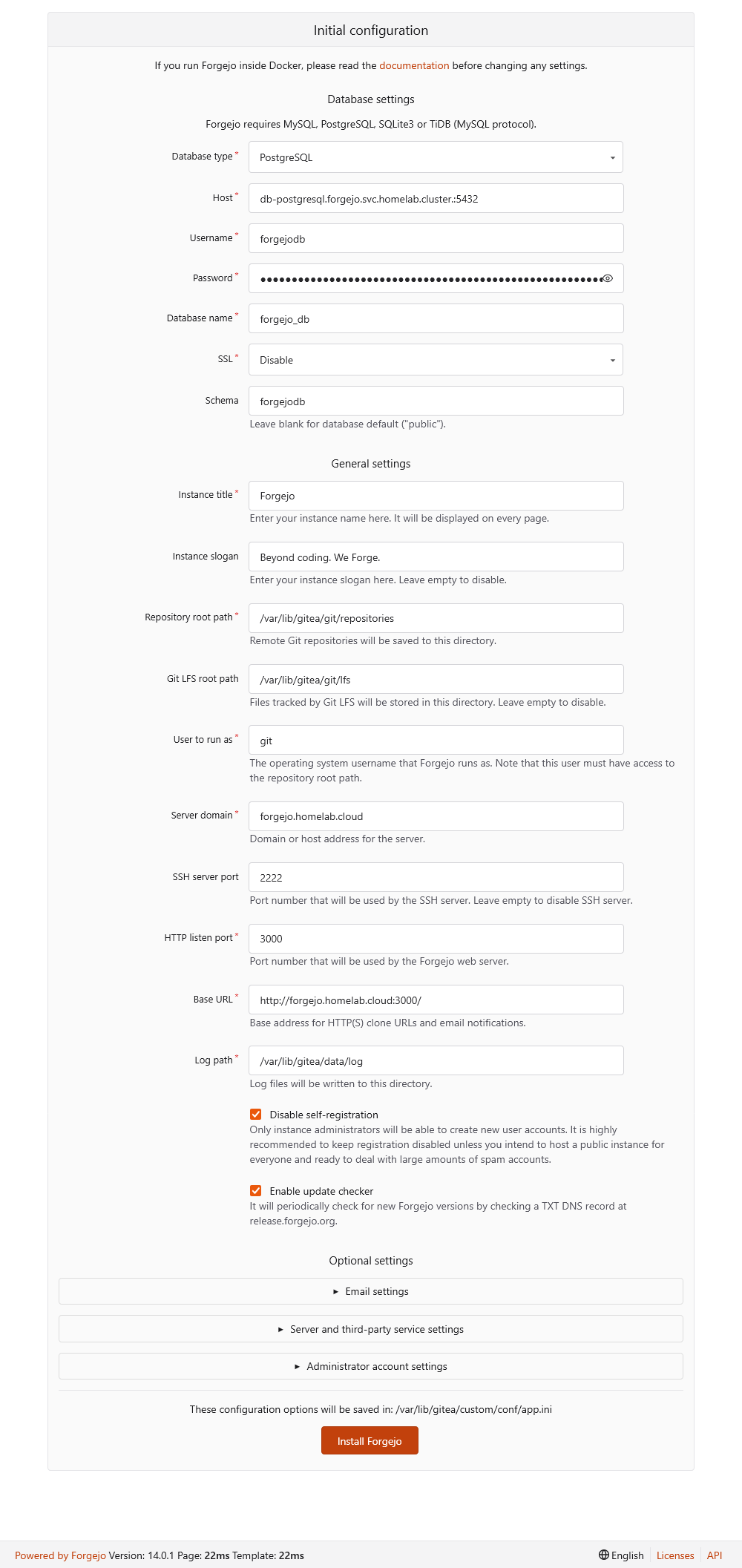
Forgejo server Initial Configuration form The fields of this form are loaded with values taken from the ones you set previously in the Forgejo server deployment, with values configured within the rootless Forgejo container image, or just with regular Forgejo default values.
This
Initial Configurationform is mandatoryGiven how this Forgejo instance has been configured, the server keeps on showing you this form until you properly finish its installation. It is possible to disable this step, but this guide leaves it enabled for creating an administrator user right in this form.
Also realize that it does not present you with all the configuration options Forgejo has, only a few selected ones. For instance, this installation form does not offer you the possibility of configuring the connection with the cache server.
In the
Database Settingsblock, ensure that the values set there correpond with the ones you configured to connect Forgejo with its PostgreSQL instance:
Database Settings fields from Forgejo server Initial Configuration form The
General Settingsfields should look like this:
General Settings fields from Forgejo server Initial Configuration form Review in this section the fields
Server domainandBase URL. Ensure they have the domain you specified in your configuration for the Forgejo server deployment. All the other fields have default values or have been set the way they are in the rootless Forgejo container image.The
Optional Settingsblock is divided in three folded sections:
Optional Settings sections from Forgejo server Initial Configuration form This guide does not cover the
Email Settings, and the options underServer and Third-Party Service Settingscan be left as they are by default. The section you need to worry about is theAdministrator Account Settings:
Administrator Account Settings in Optional Settings from Forgejo server Initial Configuration form Fill this form with a proper username, email address and password for your Forgejo administrator. For example, this guide sets the Forgejo administrator’s username as
forgejoadmand its email asforgejoadm@forgejo.homelab.cloud(this email does not exist, but it is enough to fill the corresponding field), together with a long strong password.Do not use the Forgejo administrator like a regular user
Use the Forgejo administrator only as the manager of your Forgejo platform. Never use it for working with Git repositories like a regular Git user.
After installing Forgejo, you should create at least one user to work with Git repositories regularly.
The final line is a reminder to indicate that all this setup gets saved in Forgejo’s
/var/lib/gitea/custom/conf/app.iniconfiguration file:
Environment Configuration from Forgejo server Initial Configuration form After reviewing all the fields available in this
Initial Configurationform, press on theInstall Forgejobutton at the end of the page to properly finish the deployment of your Forgejo platform:
Install Forgejo button from Forgejo server Initial Configuration form A few seconds after pressing the
Install Forgejobutton, the Forgejo server renders a loading page with an animation of its logo while it finishes the installation:
Forgejo loading page while installation in progress After a minute, the installation process ends and automatically redirects you into Forgejo’s dashboard logged in as the administrator user you specified in the
Initial Configurationform: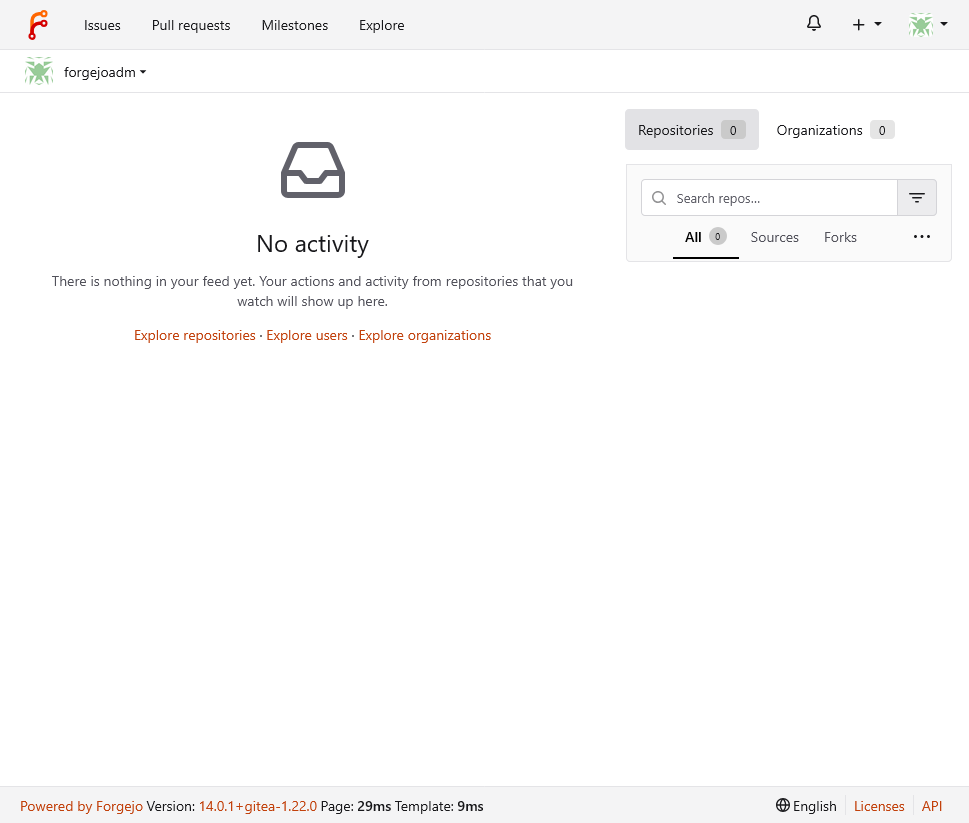
Forgejo dashboard logged in as the administrator user
Security considerations in Forgejo
With your Forgejo platform running, there are a few particular things you might like to consider to harden its security:
Enable the two-factor authentication of your administrator user:
- Never use this administrator user for everyday Forgejo usage (like for uploading Git repositories).
Create a new regular user for regular usage of your Forgejo platform:
- Enable 2FA to this regular user.
- Assign its own SSH and GPG keys to this user, which are used for Git authentication and commit signing respectively.
Forgejo platform’s Kustomize project attached to this guide
You can find the Kustomize project for this Forgejo platform deployment in the following attached folder.
Relevant system paths
Folders in kubectl client system
$HOME/k8sprjs/forgejo$HOME/k8sprjs/forgejo/components/$HOME/k8sprjs/forgejo/components/cache-redis$HOME/k8sprjs/forgejo/components/db-postgresql$HOME/k8sprjs/forgejo/components/server-forgejo$HOME/k8sprjs/forgejo/resources/
Files in kubectl client system
$HOME/k8sprjs/forgejo/kustomization.yaml$HOME/k8sprjs/forgejo/resources/forgejo-hdd-git.persistentvolume.yaml$HOME/k8sprjs/forgejo/resources/forgejo-ssd-cache.persistentvolume.yaml$HOME/k8sprjs/forgejo/resources/forgejo-ssd-data.persistentvolume.yaml$HOME/k8sprjs/forgejo/resources/forgejo-ssd-db.persistentvolume.yaml$HOME/k8sprjs/forgejo/resources/forgejo.homelab.cloud-tls.certificate.cert-manager.yaml$HOME/k8sprjs/forgejo/resources/forgejo.homelab.cloud.ingressroute.traefik.yaml$HOME/k8sprjs/forgejo/resources/forgejo.namespace.yaml
References
Forgejo
Gitea-related contents
- ServerFault. Monitor Gitea with Prometheus
- Computing For Geeks. Install and Configure Gitea Git Service on Kubernetes / OpenShift
- Ralph’s Open Source Blog. Running Gitea on Kubernetes
- Ralph’s Open Source Blog. Running Gitea on a Virtual Cloud Server
- DEV. Setup a Self-Hosted Git Service with Gitea
Kubernetes
Storage
Kubernetes Blog. Local Persistent Volumes for Kubernetes Goes Beta
Kubernetes Documentation. Reference. Kubernetes API. Config and Storage Resources
Scheduling
Kubernetes Documentation. Concepts. Scheduling, Preemption and Eviction
Kubernetes Documentation. Tasks. Configure Pods and Containers
Kubernetes Documentation. Reference. Kubernetes API. Workload Resources
StatefulSets
ConfigMaps
Other Kubernetes-related contents
About storage
StackOverFlow. Kubernetes size definitions: What’s the difference of “Gi” and “G”?
GitHub. Helm. Issue. distinguish unset and empty values for storageClassName
Kubernetes Mounting Volumes in Pods. Mount Path Ownership and Permissions
About pod scheduling
- TheNewStack. Strategies for Kubernetes Pod Placement and Scheduling
- TheNewStack. Implement Node and Pod Affinity/Anti-Affinity in Kubernetes: A Practical Example
- TheNewStack. Tutorial: Apply the Sidecar Pattern to Deploy Redis in Kubernetes