Removing Proxmox's subscription warning
About the Proxmox subscription warning
Every time you log in the Proxmox VE web console, or when you get into the updates section, you are met with the following warning:
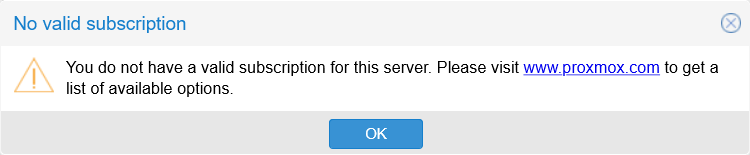
This is bothersome, but there is a way to make the web console stop showing it.
Disabling this warning has side effects on the Proxmox VE web console
When you disable this warning, certain features of the Proxmox VE web console may not work anymore. You will need to restore the warning to be able to use them.
Removing the subscription warning
Follow this procedure to remove or disable Proxmox’s subscription warning:
Open a root shell and
cdto/usr/share/javascript/proxmox-widget-toolkit:$ cd /usr/share/javascript/proxmox-widget-toolkitIn that
proxmox-widget-toolkitdirectory there is a javascript library file calledproxmoxlib.js. Make a.origbackup of it:$ cp proxmoxlib.js proxmoxlib.js.origOpen the
proxmoxlib.jsfile with a proper text editor (vi, vim or nano). Then, in the javascript code, search for the following text:Ext.Msg.show({ title: gettext('No valid subscription'),When you locate it (just search the
No valid subscriptionstring, it is unique in the code), replaceExt.Msg.showwithvoid:void({ //Ext.Msg.show({ title: gettext('No valid subscription'),Save the change and exit the editor, then restart the Proxmox VE web service:
$ systemctl restart pveproxy.serviceThis restart may take a few seconds.
Browse to the Proxmox web console, but do not forget to refresh your browser’s cache (Ctrl + F5) to ensure that you load the modified javascript. Log in and the subscription warning should not appear now.
Reverting the changes
If you need to undo the change explained before, you have three options to revert it:
Manually undoing the change you made in the
proxmoxlib.jsfile.Restoring the
.origbackup you created of the file within theproxmox-widget-toolkitdirectory:$ mv proxmoxlib.js.orig proxmoxlib.jsReinstalling the
proxmox-widget-toolkitpackage from the repository:$ apt-get install --reinstall proxmox-widget-toolkit
Change executed in just one command line
To do the change in just one (long) command line, just use the following shell command:
$ sed -Ezi.orig "s/(Ext.Msg.show\(\{\s+title: gettext\('No valid sub)/void\(\{ \/\/\1/g" /usr/share/javascript/proxmox-widget-toolkit/proxmoxlib.js && systemctl restart pveproxy.serviceFinal note
This fix is known to work on any version starting from Proxmox VE 5.1 up to 9.0. Bear also in mind that later Proxmox VE updates may undo this change and restore the warning, forcing your to apply this modification again.
Relevant system paths
Directories
/usr/share/javascript/proxmox-widget-toolkit
Files
/usr/share/javascript/proxmox-widget-toolkit/proxmoxlib.js