Deploying the Headlamp dashboard
Headlamp is an alternative to the Kubernetes Dashboard
To monitor what is going on in your K3s cluster in a more visual manner, Kubernetes offers its own native web-based dashboard. That one is fine, but there is an interesting alternative dashboard called Headlamp also worth trying out.
Ensure having the metrics-server service running in your cluster first!
To be able to show stats from your K3s cluster, Headlamp (like the Kubernetes Dashboard) requires having the metrics-server service already running in your cluster.
Components required for deploying Headlamp
To deploy Headlamp in your homelab cluster, you need:
- A service account with the cluster administrator role.
- A TLS certificate to secure communications with Headlamp.
- An HTTPS ingress to access Headlamp that uses the previously mentioned TLS certificate.
Kustomize project’s folder structure
In your kubectl client system, create the folder structure for the Headlamp Kustomize project:
$ mkdir -p $HOME/k8sprjs/headlamp/resourcesHeadlamp ServiceAccount
Prepare a ServiceAccount for Headlamp like this:
Create a
headlamp-admin.serviceaccount.yamlfile under theresourcesfolder:$ touch $HOME/k8sprjs/headlamp/resources/headlamp-admin.serviceaccount.yamlDeclare the
headlamp-adminservice account inheadlamp-admin.serviceaccount.yaml:# Headlamp administrator user apiVersion: v1 kind: ServiceAccount metadata: name: headlamp-adminThis service account will act as the administrator user for your Headlamp instance:
The name
headlamp-adminis the one expected in the official Headlamp installation. Its deployment manifest already points to a secret token for a service account calledheadlamp-admin.This declaration only creates the
headlamp-adminservice account without any special privileges in the cluster. The account needs to be bound to a cluster role to be authorized to access your K3s cluster information, something you will declare in the next section.
Service accounts are not meant for regular users
Headlamp ClusterRoleBinding
To bind the headlamp-admin service account with the required administrator role, you need a ClusterRoleBinding object:
Generate a new
cluster-admin-users.clusterrolebinding.yamlfile underresources:$ touch $HOME/k8sprjs/headlamp/resources/cluster-admin-users.clusterrolebinding.yamlIn
cluster-admin-users.clusterrolebinding.yaml, bind theheadlamp-adminwith thecluster-admincluster role:# Administrator cluster role bindings apiVersion: rbac.authorization.k8s.io/v1 kind: ClusterRoleBinding metadata: name: cluster-admin-users roleRef: apiGroup: rbac.authorization.k8s.io kind: ClusterRole name: cluster-admin subjects: - kind: ServiceAccount name: headlamp-admin namespace: kube-systemWith this declaration, you make the
headlamp-adminaccount an administrator of your cluster under thekube-systemnamespace:The
roleRefattribute specifies that the cluster role to be bound iscluster-admin, which is a built-in role in Kubernetes.In
subjectsyou list all the users you want bounded to the role indicated inroleRef. In this case, there is only theheadlamp-adminservice account.
Headlamp TLS certificate
To encrypt the client communications with Headlamp you need a TLS certificate managed with the cert-manager you deployed in a previous chapter:
Create the file
headlamp.homelab.cloud-tls.certificate.cert-manager.yamlin theresourcesfolder:$ touch $HOME/k8sprjs/headlamp/resources/headlamp.homelab.cloud-tls.certificate.cert-manager.yamlDeclare a self-signed “leaf” certificate in
headlamp.homelab.cloud-tls.certificate.cert-manager.yaml:# TLS certificate for Headlamp apiVersion: cert-manager.io/v1 kind: Certificate metadata: name: headlamp.homelab.cloud-tls spec: isCA: false secretName: headlamp.homelab.cloud-tls duration: 2190h # 3 months renewBefore: 168h # Certificates must be renewed some time before they expire (7 days) dnsNames: - headlamp.homelab.cloud privateKey: algorithm: ECDSA size: 521 encoding: PKCS8 rotationPolicy: Always issuerRef: name: homelab.cloud-intm-ca01-issuer kind: ClusterIssuer group: cert-manager.ioThis certificate is similar to the ones created for the self-signed CA issuers already explained in the chapter about deploying cert-manager, except for:
The
spec.isCAparameter set tofalsemakes this certificate a “leaf” one that cannot be used to issue other certificates.There is no
spec.commonNamebecause the official cert-manager documentation recommends setting this attribute only in CA certificates, and leaving it unset in “leaf” certificates.Its
durationandrenewBeforevalues are half of the ones set to the certificate of the intermediate CA issuing this Headlamp certificate.The list in
spec.dnsNamesspecifies which domains this certificate corresponds to.The
spec.issuerRefinvokes the intermediate CA already available in your cluster as issuer of this Headlamp certificate.
Headlamp IngressRoute
To enable ingress access into Headlamp, use a Traefik IngressRoute:
Create the
headlamp.ingressroute.traefik.yamlfile under theresourcesfolder:$ touch $HOME/k8sprjs/headlamp/resources/headlamp.ingressroute.traefik.yamlIn
resources/headlamp.ingressroute.traefik.yaml, specify the TraefikIngressRouteresource for accessing Headlamp through HTTPS:# HTTPS ingress for Headlamp apiVersion: traefik.io/v1alpha1 kind: IngressRoute metadata: name: headlamp spec: entryPoints: - websecure routes: - match: Host(`headlamp.homelab.cloud`) kind: Rule services: - name: headlamp kind: Service port: 80 tls: secretName: headlamp.homelab.cloud-tlsDetails you should pay attention to in this Traefik
IngressRoutedeclaration are:The
spec.entryPointsis set towebsecureonly, which corresponds to the Traefik service’s HTTPS port.The
spec.routes.matchenables the URL to reach Headlamp through Traefik.The domain name must be enabled in your local network
Your equivalent of the hostname seen in the YAML above will not be reachable unless you enable it from a DNS service (your local network’s router could provide it), or specify it in the
hostsfile of the clients you want to access from.The
spec.routes.servicesonly has an entry for the Headlamp service, linking it to this IngressRoute.The
spec.tls.secretNamepoints to the secret associated to the Headlamp certificate declared in the previous step. This enables the TLS termination at the ingress level, while the communication with Headlamp will still be done in HTTP.
Kustomize manifest for the Headlamp project
With all the required resources declared, put them all together with the manifest that deploys Headlamp itself in the Kustomize YAML of this project:
Create the
kustomization.yamlfile for the Kustomize project:$ touch $HOME/k8sprjs/headlamp/kustomization.yamlPut in the
kustomization.yamlfile the followingKustomizationmanifest:# Headlamp setup apiVersion: kustomize.config.k8s.io/v1beta1 kind: Kustomization namespace: kube-system resources: - resources/headlamp-admin.serviceaccount.yaml - resources/cluster-admin-users.clusterrolebinding.yaml - resources/headlamp.homelab.cloud-tls.certificate.cert-manager.yaml - resources/headlamp.ingressroute.traefik.yaml - https://raw.githubusercontent.com/kubernetes-sigs/headlamp/main/kubernetes-headlamp.yamlThe
namespacedeclaration sets thekube-systemnamespace to all the namespaced resources (theClusterRoleBindingobject is not namespaced since it has a cluster-wide nature) declared in this Kustomize project, and also to their invocations within standard Kubernetes objects (not in custom ones). Thekube-systemnamespace is where the Headlamp service is going to be deployed. It is important that all namespaced resources are in the same namespace as Headlamp. In particular, the service account must be in the same namespace as Headlamp to authorize this service to access the cluster information it needs to work.
Validating the Kustomize YAML output
You may want to take a look at how the resources you declared appear in the Kustomize output before deploying:
Execute the
kubectl kustomizecommand on the Headlamp Kustomize project main folder, redirected toless(or to your favorite text editor):$ kubectl kustomize $HOME/k8sprjs/headlamp | lessCompare your YAML output with this one:
apiVersion: v1
kind: ServiceAccount
metadata:
  name: headlamp-admin
  namespace: kube-system
---
apiVersion: rbac.authorization.k8s.io/v1
kind: ClusterRoleBinding
metadata:
  name: cluster-admin-users
roleRef:
  apiGroup: rbac.authorization.k8s.io
  kind: ClusterRole
  name: cluster-admin
subjects:
- kind: ServiceAccount
  name: headlamp-admin
  namespace: kube-system
---
apiVersion: v1
kind: Secret
metadata:
  annotations:
    kubernetes.io/service-account.name: headlamp-admin
  name: headlamp-admin
  namespace: kube-system
type: kubernetes.io/service-account-token
---
apiVersion: v1
kind: Service
metadata:
  name: headlamp
  namespace: kube-system
spec:
  ports:
  - port: 80
    targetPort: 4466
  selector:
    k8s-app: headlamp
---
apiVersion: apps/v1
kind: Deployment
metadata:
  name: headlamp
  namespace: kube-system
spec:
  replicas: 1
  selector:
    matchLabels:
      k8s-app: headlamp
  template:
    metadata:
      labels:
        k8s-app: headlamp
    spec:
      containers:
      - args:
        - -in-cluster
        - -plugins-dir=/headlamp/plugins
        env:
        - name: HEADLAMP_CONFIG_TRACING_ENABLED
          value: "true"
        - name: HEADLAMP_CONFIG_METRICS_ENABLED
          value: "true"
        - name: HEADLAMP_CONFIG_OTLP_ENDPOINT
          value: otel-collector:4317
        - name: HEADLAMP_CONFIG_SERVICE_NAME
          value: headlamp
        - name: HEADLAMP_CONFIG_SERVICE_VERSION
          value: latest
        image: ghcr.io/headlamp-k8s/headlamp:latest
        livenessProbe:
          httpGet:
            path: /
            port: 4466
            scheme: HTTP
          initialDelaySeconds: 30
          timeoutSeconds: 30
        name: headlamp
        ports:
        - containerPort: 4466
          name: http
        - containerPort: 9090
          name: metrics
        readinessProbe:
          httpGet:
            path: /
            port: 4466
            scheme: HTTP
          initialDelaySeconds: 30
          timeoutSeconds: 30
      nodeSelector:
        kubernetes.io/os: linux
---
apiVersion: cert-manager.io/v1
kind: Certificate
metadata:
  name: headlamp.homelab.cloud-tls
  namespace: kube-system
spec:
  dnsNames:
  - headlamp.homelab.cloud
  duration: 2190h
  isCA: false
  issuerRef:
    group: cert-manager.io
    kind: ClusterIssuer
    name: homelab.cloud-intm-ca01-issuer
  privateKey:
    algorithm: ECDSA
    encoding: PKCS8
    rotationPolicy: Always
    size: 521
  renewBefore: 168h
  secretName: headlamp.homelab.cloud-tls
---
apiVersion: traefik.io/v1alpha1
kind: IngressRoute
metadata:
  name: headlamp
  namespace: kube-system
spec:
  entryPoints:
  - websecure
  routes:
  - kind: Rule
    match: Host(`headlamp.homelab.cloud`)
    services:
    - kind: Service
      name: headlamp
      port: 80
  tls:
    secretName: headlamp.homelab.cloud-tls
In this output you can see the combination of the resources you declared (
ServiceAccount,ClusterRoleBinding, TLSCertificate,IngressRoute) with the objects included in the official Headlamp manifest:Secret
The main thing to notice in this object is that it expects to have available aServiceAccountnamedheadlamp-admin, right the one you declared.Service
Is a regularServicethat has the particularity of exposing the port80instead of the4466used by Headlamp. This does not matter much since the TraefikIngressRouteis the one making the ingress go through an HTTPS connection that uses the443port.Deployment
ADeploymentresource is the standard object for deploying pods in Kubernetes. In this case, it configures a pod for Headlamp with a single container:spec.replicas
Is set to make this deployment produce only one Headlamp pod.spec.template.spec.containers
Under this block there are a few details worth highlighting:args
Specifies a couple of parameters that affect the behavior of the Headlamp server binary. The-in-clusteroption indicates Headlamp that is running in the same cluster it is monitoring. The-plugin-dirparameter just indicates the path within the pod where Headlamp can find its plugins.env
These are environment variables that get imported in the Headlamp’s pod, affecting the behavior of the Headlamp server.These variables are not explained in the official Headlamp documentation
At the time of writing this note, they are not found even by the search tool of the Headlamp documentation site.
image
Important to notice that it points to thelatestimage of the Headlamp container. Every time Headlamp gets deployed in your cluster, it will be its last available version.livenessProbeandreadinessProbe
Probes that regularly check if the Headlamp server is running properly and can respond to HTTP requests in the4466port.name
Just the name given to the container in the deployment.ports
Here notice that there are two ports declared:httpwhere Headlamp is served.metricswhich returns the Prometheus-compatible metrics of this Headlamp instance.
spec.template.spec.nodeSelector
This selector ensures that the pod only deploys in nodes that are running on a Linux system, like the Debian OS you have running on each of your K3s cluster nodes.
In the upcoming chapters you will see again all these and many other parameters when you prepare the deployments of Ghost, Forgejo and the monitoring stack.
Deploying Headlamp
After reviewing the Headlamp Kustomize project’s output, you can apply its manifest in your cluster:
Apply the Kustomize project to your cluster:
$ kubectl apply -k $HOME/k8sprjs/headlampGive Headlamp around a minute to boot up, then verify that its corresponding pod and service are running under the
kube-systemnamespace:$ kubectl get pods,svc -n kube-system | grep headlamp pod/headlamp-747b5f4d5-tntzn 1/1 Running 0 53s service/headlamp ClusterIP 10.43.27.248 <none> 80/TCP 55s
Getting the administrator user’s service account token
To log in Headlamp with the headlamp-admin user you created in its deployment, you need to authenticate with a service account token associated to that user. This is a secret token you can create with kubectl:
$ kubectl -n kube-system create token headlamp-admin --duration=8760h
eyJhbGciOiJSUzI1NiIsImtpZCI6ImtxNzh0bmk3cDAzVU4zXzFnMVgwZXVSR3c0U1FnNVZ3OUtSdDBSTkw2WmsifQ.eyJpc3MiOiJrdWJlcm5ldGVzL3NlcnZpY2VhY2NvdW50Iiwia3ViZXJuZXRlcy5pby9zZXJ2aWNlYWNjb3VudC9uYW1lc3BhY2UiOiJrdWJlcm5ldGVzLWRhc2hib2FyZCIsImt1YmVybmV0ZXMuaW8vc2VydmljZWFjY291bnQvc2VjcmV0Lm5hbWUiOiJhZG1pbi11c2VyLXRva2VuLXFiMnQ1Iiwia3ViZXJuZXRlcy5pby9zZXJ2aWNlYWNjb3VudC9zZXJ2aWNlLWFjY291bnQubmFtZSI6ImFkbWluLXVzZXIiLCJrdWJlcm5ldGVzLmlvL3NlcnZpY2VhY2NvdW50L3NlcnZpY2UtYWNjb3VudC51aWQiOiI4MjU4Mjc4ZC02YjBmLTQwZDItOTI1Yy1kMzEwMmY3MTkxYzQiLCJzdWIiOiJzeXN0ZW06c2VydmljZWFjY291bnQ6a3ViZXJuZXRlcy1kYXNoYm9hcmQ6YWRtaW4tdXNlciJ9.PG-4qfeT3C6vFfwhdGDoXVmjDEU7TJDTftcmIa2kQO0HtWM8ZN45wDGk4ZSWUR5mO5HlXpYORiGkKHq6GNPFRr_qCo4tKIONyZbgXtV98P6OpOIrfDTJCwxjFf0aqOmEs1N3BqViFs3MgBRCLElx98rD6AXehdxPADXlAksnaypKKx6q1WFgNmOTHfC9WrpQzX-qoo8CbRRCuSyTagm3qkpa5hV5RjyKjE7IaOqQGwFOSbTqMy6eghTYSufC-uUxcOWw3OPVa9QzINOn9_tioxj7tH7rpw_eOHzUW_-Cr_HE89DygnuZAqQEsWxBLfYcrBKtnMhxn49E22SyCaJldA
Be aware that:
This service account token is associated to the
headlamp-adminservice account existing in thekube-systemnamespace.The command outputs your
headlamp-admin’s secret token string directly in your shell. Remember to copy and save it somewhere safe such as a password manager.The
--duration=8760hmakes this token last for 365 days, although you may prefer it to expire sooner for security reasons. By default, a service account token expires after one hour, but it can also expire when the associated pod is deleted. By setting a specific duration, the token will last for the time period set with--duration, regardless of what happens to the pod.Use the
kubectl create tokencommand again for refreshing the service account tokenWhenever your current secret token for your
headlamp-adminservice account becomes invalid, generate a new service account token with the samekubectlcommand.
Testing Headlamp
Now that you have Headlamp deployed, you can test it if you have enabled its DNS name or hostname in your LAN. In this guide, Headlamp has the hostname headlamp.homelab.cloud:
Associate the Headlamp’s DNS name or hostname to your Traefik service’s IP
Since Headlamp is served through Traefik, you have to associate its DNS name to the Traefik service’s IP. In your client system’s hosts file, you would do it like this with the values used in this guide:
10.7.0.1 traefik.homelab.cloud headlamp.homelab.cloudSee how Headlamp’s DNS name goes after the one for Traefik. The Traefik service can figure out where to redirect clients depending on the DNS name indicated in their requests.
Open a browser in your client system and go to
https://headlamp.homelab.cloud/, or whatever hostname you may have configured for your Headlamp dashboard. The browser will warn you about the connection being insecure. Accept the warning to reach Headlamp’s authentication form: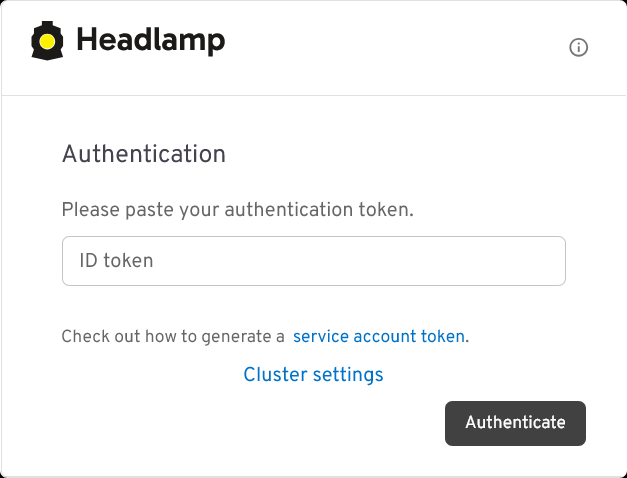
Headlamp authentication form with secret token This form requests an authentication token for signing into Headlamp. Use the
headlamp-adminservice account’s token you generated previously to authenticate into Headlamp.After authenticating, you get directly into Headlamp’s
Clusterspage: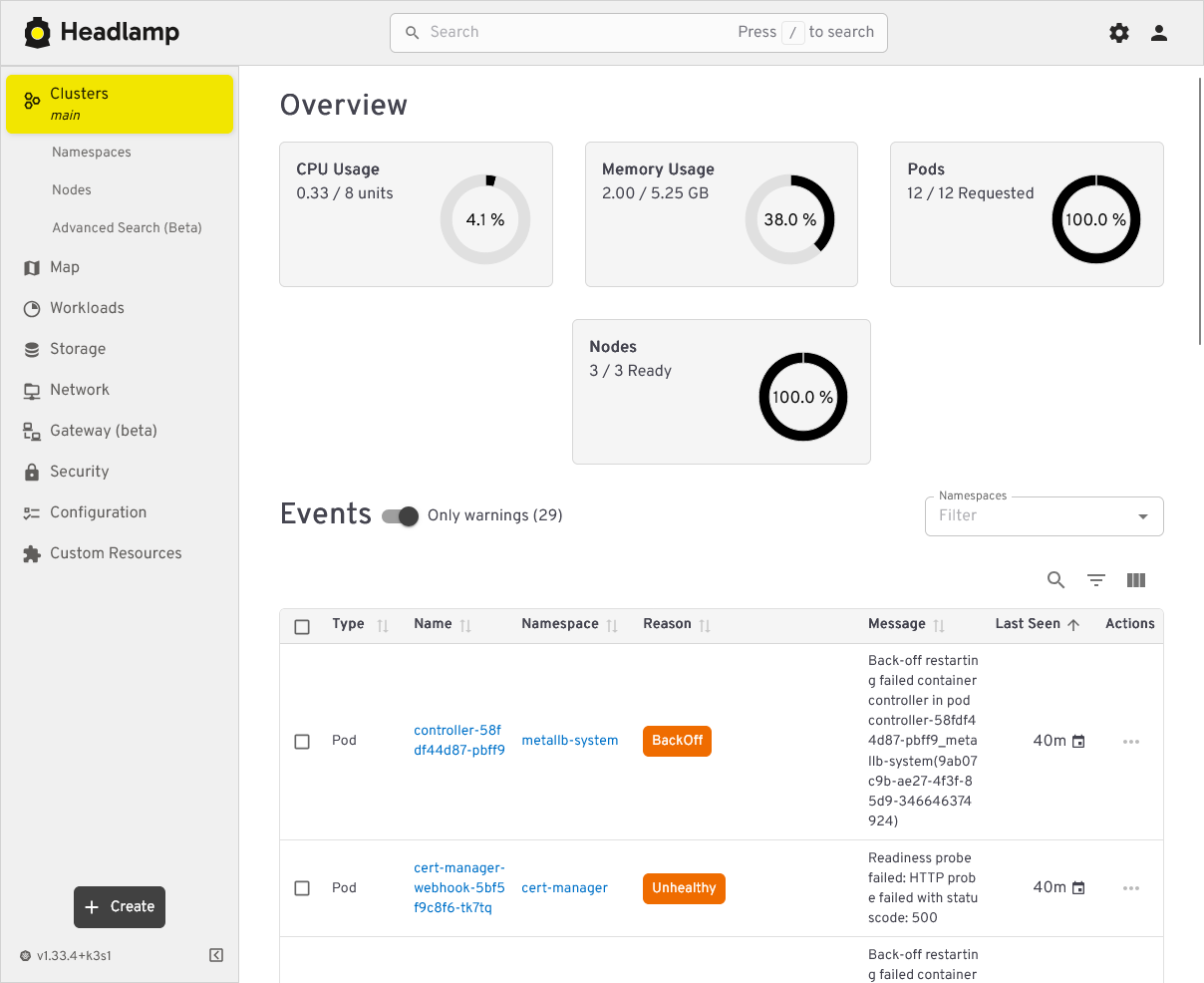
Headlamp Clusters main page This the main page of Headlamp. It provides you with a summarized view of your cluster status, including statistics about resources usage and a listing of events that have happened in your cluster. If you happen to have warning events, this page will automatically enable the “Only warnings” mode to show you just warning events.
Try out the other views Headlamp offers to get familiarized with this tool. In particular, you may like to try out the
Map: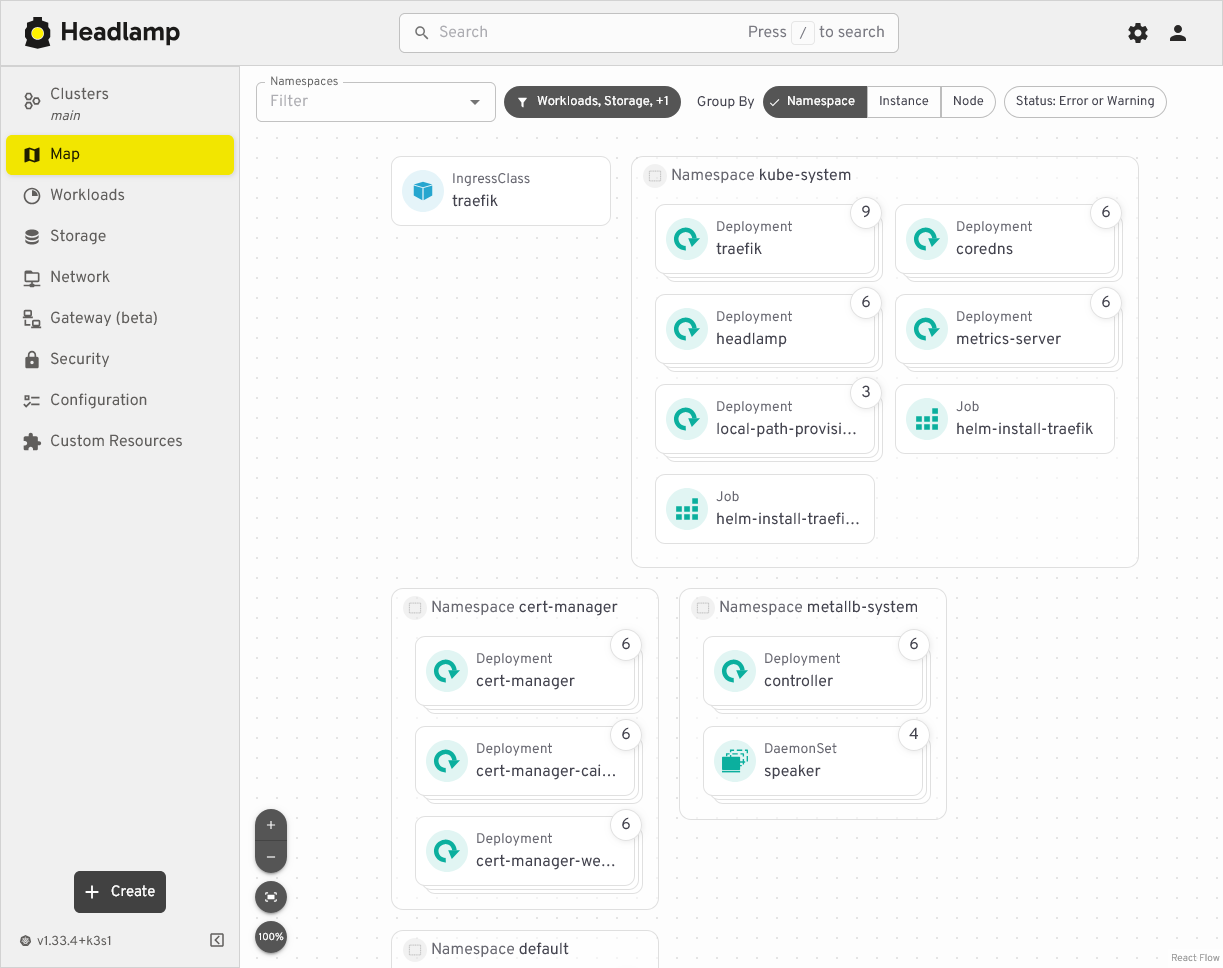
Headlamp Map view of cluster components This view provides a zoomable map that can show your cluster components grouped under three different criteria: by namespace, by instance, or by node. This feature will help you to locate more easily any component deployed in your K3s cluster.
Headlamp’s Kustomize project attached to this guide
You can find the Kustomize project for this Headlamp deployment in this attached folder:
Relevant system paths
Folders in kubectl client system
$HOME/k8sprjs/headlamp$HOME/k8sprjs/headlamp/resources
Files in kubectl client system
$HOME/k8sprjs/headlamp/kustomization.yaml$HOME/k8sprjs/headlamp/resources/cluster-admin-users.clusterrolebinding.yaml$HOME/k8sprjs/headlamp/resources/headlamp-admin.serviceaccount.yaml$HOME/k8sprjs/headlamp/resources/headlamp.homelab.cloud-tls.certificate.cert-manager.yaml$HOME/k8sprjs/headlamp/resources/headlamp.ingressroute.traefik.yaml